> For the complete documentation index, see [llms.txt](https://fastapi-docs.duonghuuphuc.com/llms.txt). Markdown versions of documentation pages are available by appending `.md` to page URLs; this page is available as [Markdown](https://fastapi-docs.duonghuuphuc.com/unit-18-jwt-authentication-with-fastapi.md).
# Unit 18: JWT Authentication with FastAPI
{% hint style="info" %}
## Note:
This unit has been completely rewritten to use the `pwdlib` library, as the previously used `passlib` is now outdated and deprecated.
**Heads-up:** Be aware that AI code generators (e.g., Google Gemini, ChatGPT, Claude) may still suggest using the old `passlib` library. Ensure you are using `pwdlib` as demonstrated in this tutorial.
{% endhint %}
## Introduction
**JWT (JSON Web Token)** is a compact, secure means for transmitting information as a JSON object. It's commonly used for authentication and authorization purposes.
***
## What is JWT?
A JSON Web Token (JWT), pronounced *"jot"*, is an open standard (`RFC 7519`) for securely transmitting information between parties as a JSON object. This information can be verified and trusted because it is digitally signed. JWTs are compact, URL-safe, and commonly used for authentication and authorization in web applications and APIs, especially in microservices architectures.
Think of it like an event wristband. 🎟️
* Self-contained: It contains all the information needed about you (e.g., your access level: VIP, General Admission).
* Verifiable: Security can look at the wristband's color and design to verify it's authentic without needing to check a central database every time.
* Tamper-proof: If you try to alter it, the change will be obvious, and you'll be denied entry.
***
## JWT Structure
A JWT consists of **three parts** separated by dots (`.`), for example:
{% code overflow="wrap" %}
```
eyJhbGciOiJIUzI1NiIsInR5cCI6IkpXVCJ9.eyJzdWIiOiIxMjM0NTY3ODkwIiwibmFtZSI6IkpvaG4gRG9lIiwiaWF0IjoxNTE2MjM5MDIyLCJleHAiOjE3MjkzODQwMDB9.SflKxwRJSMeKKF2QT4fwpMeJf36POk6yJV_adQssw5c
```
{% endcode %}
1. **Header**: Identifies which algorithm was used to generate the signature.
* Content: `{"alg": "HS256", "typ": "JWT"}`
* Format: [Base64Url](https://developer.mozilla.org/en-US/docs/Glossary/Base64) encoded.
2. **Payload**: Contains the "claims", which are statements about an entity (typically, the user) and additional data.
* Content: `{"sub": "1234567890", "name": "John Doe", "iat": 1516239022, "exp": 1729384000}`
* Standard Claims: `sub` (subject/user ID), `exp` (expiration time), `iat` (issued at).
* Format: Base64Url encoded.
3. **Signature**: Used to verify that the sender of the JWT is who it says it is and to ensure that the message wasn't changed along the way.
* Creation: It's created by signing the encoded header, the encoded payload, and a secret key using the algorithm specified in the header.
* Formula: `HMACSHA256(base64UrlEncode(header) + "." + base64UrlEncode(payload), secret_key)`
***
## Advantages of JWT
* Stateless authentication
* Secure information exchange
* Easy integration with frontend frameworks
***
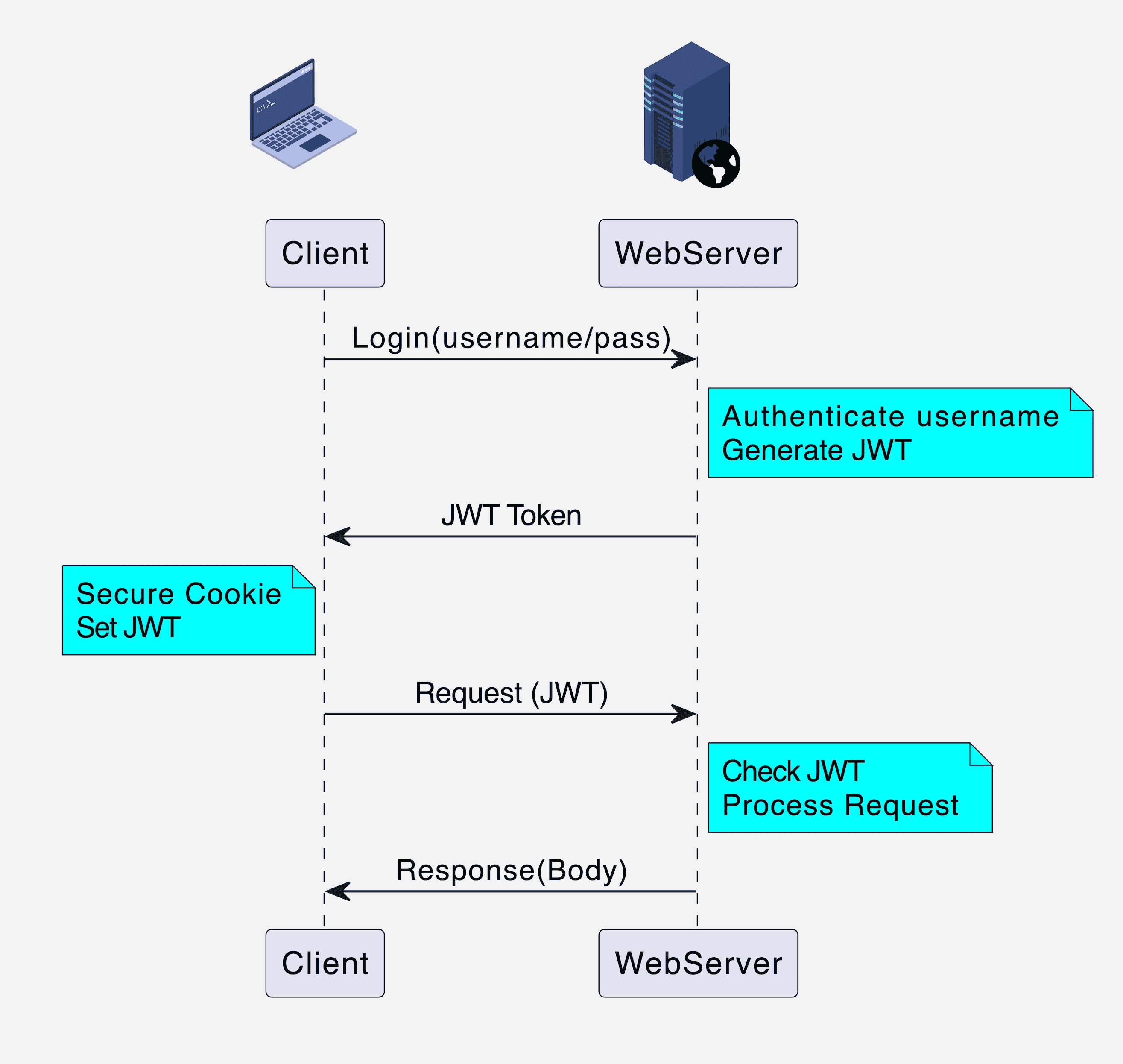
## How JWT Authentication Works in FastAPI
JWT Bearer Flow. Source: Internet
Here's the typical JWT Bearer flow:
1. **Login**: A user sends their credentials (e.g., username and password) to a login endpoint (e.g., `/token`).
2. **Verification**: The server validates the credentials against a database.
3. **Token Creation**: If the credentials are valid, the server creates a JWT, signing it with a secret key known only to the server. The payload contains user identifiers (like a user ID or username) and an expiration time.
4. **Token Issuance**: The server sends the JWT back to the client.
5. **Token Storage**: The client stores this token (e.g., in `localStorage` or a secure cookie).
6. **Authenticated Requests**: For every subsequent request to a protected endpoint, the client sends the JWT in the `Authorization` header, using the `Bearer` schema: `Authorization: Bearer `.
7. **Server Protection**: Protected endpoints in the FastAPI application will have a dependency that:
* Extracts the token from the header.
* Verifies the signature using the secret key.
* Checks the claims (e.g., that the token hasn't expired).
* If the token is valid, it processes the request. Otherwise, it returns a `401 Unauthorized` error.
***
## Implementing JWT in FastAPI
### **Step 1:** Install Dependencies
```bash
pip install "python-jose[cryptography]" "pwdlib[argon2]" "python-multipart"
```
### **Step 2:** Create a `main.py`
```python
import os
from datetime import datetime, timedelta, timezone
from typing import Annotated
from fastapi import Depends, FastAPI, HTTPException, status
from fastapi.security import OAuth2PasswordBearer, OAuth2PasswordRequestForm
from jose import JWTError, jwt
from pwdlib import PasswordHash
from pydantic import BaseModel
# (1) --- Configurations ---
# This key is a secret. In a real app, load it from environment variables.
SECRET_KEY = "Your-Super-Secret-Key"
ALGORITHM = "HS256"
ACCESS_TOKEN_EXPIRE_MINUTES = 120
# Password Hashing
pwd_context = PasswordHash.recommended()
# OAuth2 Scheme
oauth2_scheme = OAuth2PasswordBearer(tokenUrl="token")
# Pydantic Models
class Token(BaseModel):
access_token: str
token_type: str
class TokenData(BaseModel):
username: str | None = None
class User(BaseModel):
username: str
email: str | None = None
full_name: str | None = None
disabled: bool | None = None
class UserInDB(User):
hashed_password: str
# Create FastAPI app instance
app = FastAPI(title="JWT Demonstration",
description="A JWT demonstration with FastAPI",
version="0.1.0")
# (2) --- Mock Database ---
fake_users_db = {
"john.doe": {
"username": "john.doe",
"full_name": "John Doe",
"email": "john.doe@example.com",
"hashed_password": pwd_context.hash("mypassword"), # Hashed password
"disabled": False,
}
}
# (3) --- Utility Functions ---
def verify_password(plain_password, hashed_password):
"""Verifies a plain password against a hashed one."""
return pwd_context.verify(plain_password, hashed_password)
def get_user(db, username: str):
"""Retrieves a user from the mock database."""
if username in db:
user_dict = db[username]
return UserInDB(**user_dict)
return None
def create_access_token(data: dict, expires_delta: timedelta | None = None):
"""Creates a new JWT access token."""
to_encode = data.copy()
if expires_delta:
expire = datetime.now(timezone.utc) + expires_delta
else:
expire = datetime.now(timezone.utc) + timedelta(minutes=15)
to_encode.update({"exp": expire})
encoded_jwt = jwt.encode(to_encode, SECRET_KEY, algorithm=ALGORITHM)
return encoded_jwt
# (4) --- Dependency to get current user ---
async def get_current_active_user(token: Annotated[str, Depends(oauth2_scheme)]):
"""
Decodes the JWT token to get the current user.
This function acts as a dependency for protected endpoints.
"""
credentials_exception = HTTPException(
status_code=status.HTTP_401_UNAUTHORIZED,
detail="Could not validate credentials",
headers={"WWW-Authenticate": "Bearer"},
)
try:
# Decode the token
payload = jwt.decode(token, SECRET_KEY, algorithms=[ALGORITHM])
username: str = payload.get("sub")
if username is None:
raise credentials_exception
token_data = TokenData(username=username)
except JWTError:
raise credentials_exception
# Get user from the 'database'
user = get_user(fake_users_db, username=token_data.username)
if user is None:
raise credentials_exception
if user.disabled:
raise HTTPException(status_code=400, detail="Inactive user")
return user
# (5) --- API Endpoints ---
@app.post("/token", response_model=Token)
async def login_for_access_token(form_data: Annotated[OAuth2PasswordRequestForm, Depends()]):
"""
Takes username and password from a form and returns a JWT token.
"""
user = get_user(fake_users_db, form_data.username)
if not user or not verify_password(form_data.password, user.hashed_password):
raise HTTPException(
status_code=status.HTTP_401_UNAUTHORIZED,
detail="Incorrect username or password",
headers={"WWW-Authenticate": "Bearer"},
)
access_token_expires = timedelta(minutes=ACCESS_TOKEN_EXPIRE_MINUTES)
access_token = create_access_token(
data={"sub": user.username}, expires_delta=access_token_expires
)
return {"access_token": access_token, "token_type": "bearer"}
@app.get("/users/me/", response_model=User)
async def read_users_me(current_user: Annotated[User, Depends(get_current_active_user)]):
"""
A protected endpoint that returns the current user's data.
"""
return current_user
@app.get("/")
async def read_root():
"""A public endpoint that anyone can access."""
return {"message": "Hello, this is a demonstration of JWT in FastAPI!"}
```
***
## Testing the Application
You can test the application's endpoints using two popular tools: Swagger Docs and Postman. This section will guide you through the process for both.
### Using Swagger
Execute the following command to run the program:
```
uvicorn main:app --reload --port 8081
```
Then, visit the Swagger Docs at and the result is as below figure.
Now, click the Authorize button on the right hand-side and enter the username/password as declared in the program (Username: `john.doe` | Password: `mypassword` ), and click Authorize button. Once authorized, call the endpoint `/users/me/` to get the expected response shown below:
```json
{
"username": "john.doe",
"email": "john.doe@example.com",
"full_name": "John Doe",
"disabled": false
}
```
### Using Postman
The following video will show you how to test JWT in Postman.
{% embed url="" %}
***
## Exercises
**Q1.** To understand the structure of a JWT and how its claims are tamper-proof without writing any backend code, you first generate an JWT string and the secret key used to sign it. Your task is to use the [JWT.IO](https://www.jwt.io/) tool to decode it, inspect its contents, and understand what happens when you try to alter it.
**Q2.** Modify the JWT to include user roles (admin, user) and restrict access to specific endpoints based on these roles.
Hint:
* Modify the Database: In the `fake_users_db`, add a `role` to each user. Create at least one `admin` and one `user`.
```python
# Example modification
fake_users_db = {
"john.doe": {
"username": "john.doe",
# ... other fields
"hashed_password": pwd_context.hash("secretpassword"),
"role": "user", # Add this
"disabled": False,
},
"jane.admin": {
"username": "jane.admin",
"full_name": "Jane Admin",
"email": "jane.admin@example.com",
"hashed_password": pwd_context.hash("adminpass"),
"role": "admin", # Add this
"disabled": False,
}
}
```
* Update Token Creation: Modify the `/token` endpoint's logic. When you create the access token, add the user's `role` as a custom claim in the payload.
```python
# Hint: In your /token endpoint
access_token = create_access_token(
data={"sub": user.username, "role": user.role}, # Add the role here
expires_delta=access_token_expires
)
```
* Create a Dependency for Admins: Create a new dependency function called `get_current_admin_user`. This function should reuse `get_current_active_user` but add an extra check. It must verify that the `role` claim in the token's payload is exactly `"admin"`. If not, it should raise an `HTTPException` with a `status_code` of `403 Forbidden` and a detail message like "Admin privileges required".
* Create the Protected Endpoint: Create a new endpoint `GET /admin/dashboard` that depends on `get_current_admin_user`. If successful, it should return a message like `{"message": "Welcome to the admin dashboard, {username}!"}`.